From keywords to a structured Google Ads campaign — in minutes
Type your seed keywords and pick your markets (top 10 western countries pre-selected). GForge scans live Google results to reveal the advertisers bidding on them, pulls each advertiser’s other paid keywords with volume and CPC, overlays 12-month Google Trends — then turns your list into a best-practice structure: themed ad groups, responsive search ads, match types and negatives. Push it via the API (created paused), download a Google Ads Editor CSV, or copy the schema. Quick links create your campaign, GA4 property and Search Console verification in clicks.
7-day free trial on every plan · cancel anytime
See exactly what you get
Real screens, real workflows — this is the tool, not a mockup.
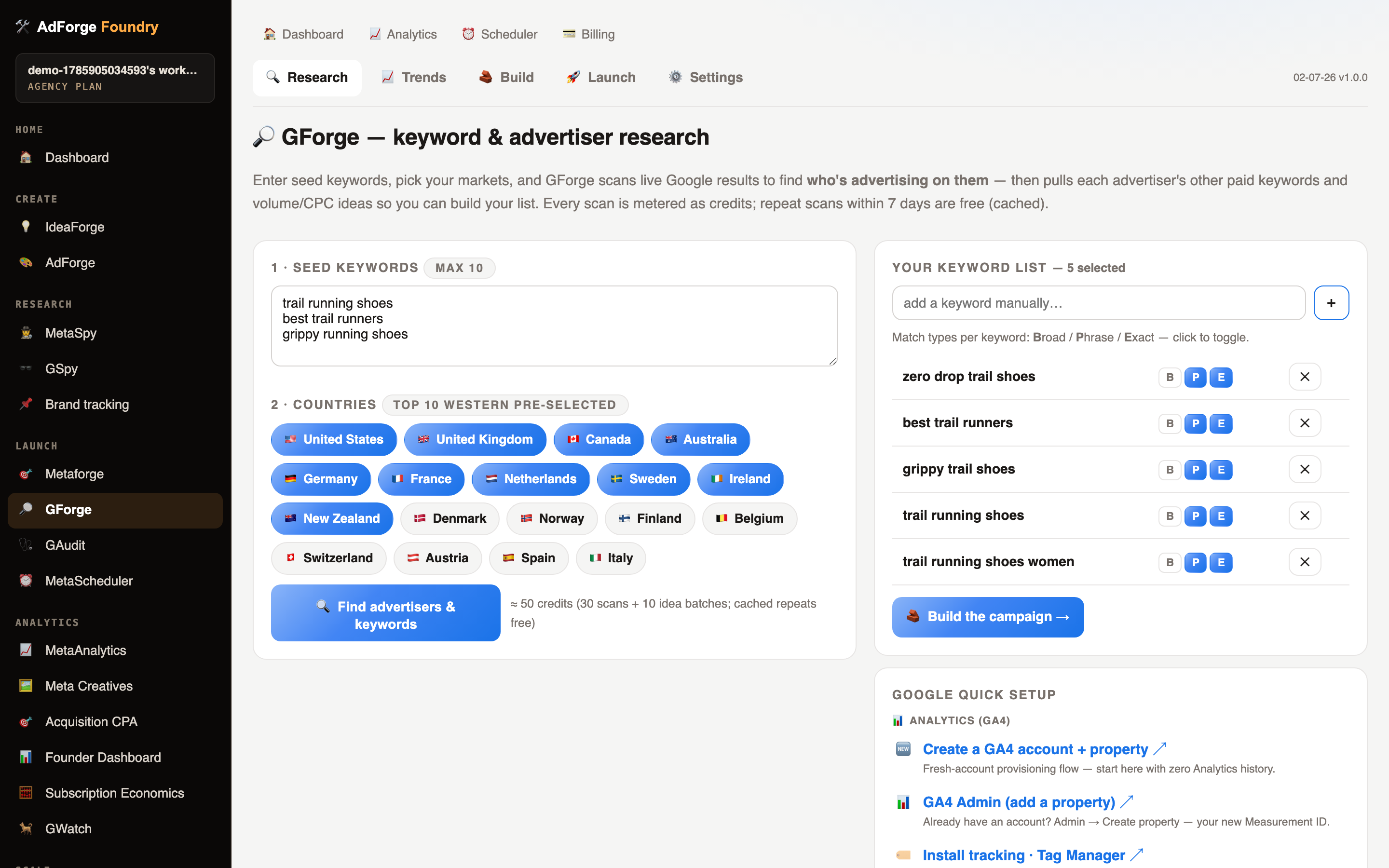
Seed keywords in, advertiser intel out
Type your seeds, flip your markets on (the top-10 western countries come pre-toggled) and the cost is quoted up front in credits. Every scan reveals who’s bidding on your keywords — with each advertiser’s other paid keywords one click away.
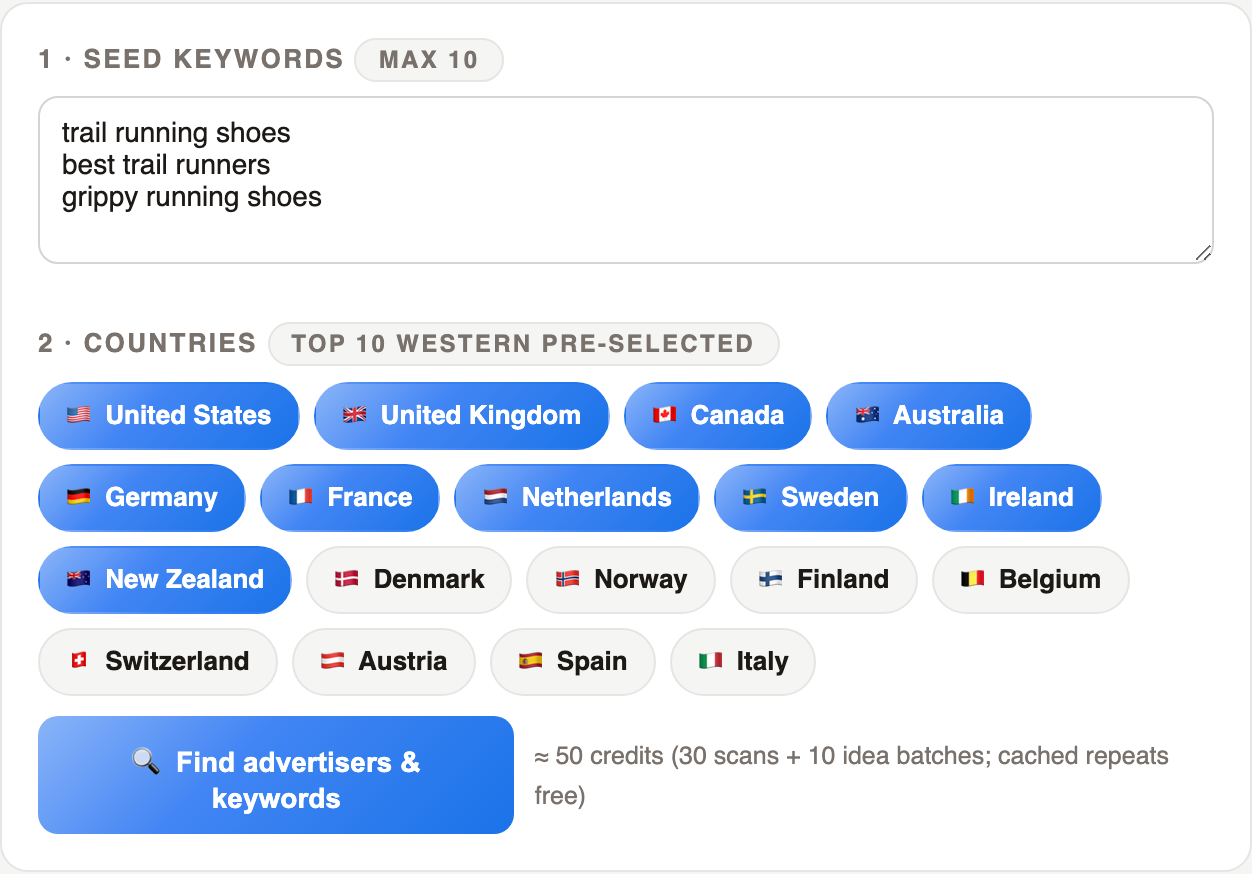
The whole campaign, previewed before anything ships
Themed ad groups, keywords with match types, responsive search ads and negatives — rendered as a schema tree you can push to Google via the API (created paused), download as a Google Ads Editor CSV, or copy as text. Three ways out, zero lock-in.
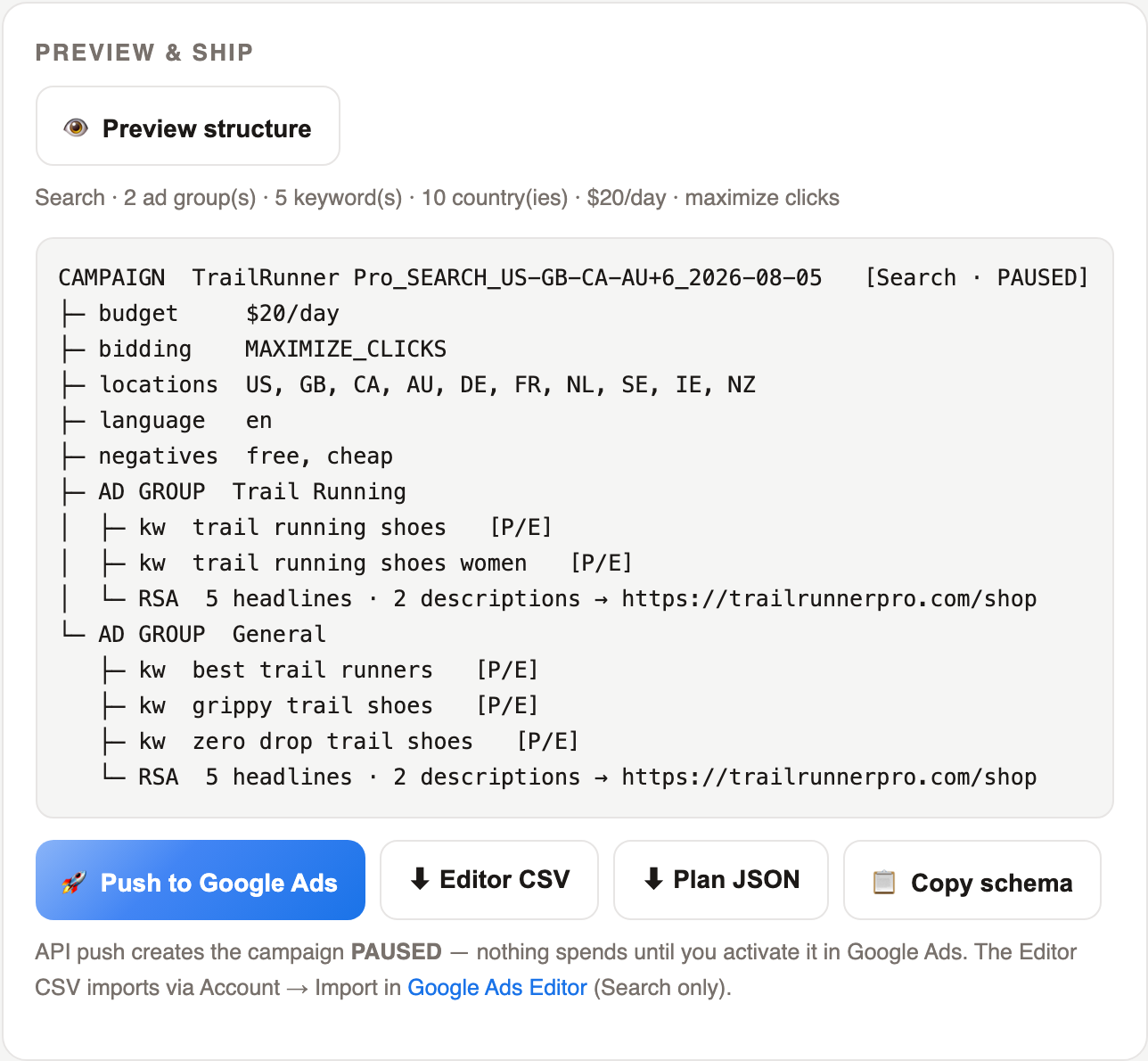
The whole Google setup, deep-linked — one screen, one click each
A fresh Google Ads account (Expert-Mode tip included), billing, GA4 account provisioning with 1-click tracking installs (Tag Manager, Shopify, WordPress, gtag), Search Console verification + sitemap, GA4↔Ads linking, API Center — every setup flow you’d otherwise go googling for.
Built to do one job brilliantly
Advertiser discovery by keyword
See exactly who runs Google ads on your keywords, per country — with each advertiser’s other paid keywords one click away to grow your list.
Volume, CPC & Trends before you spend
Every keyword idea comes with monthly searches, CPC and competition from Google Ads data, plus 12-month Google Trends curves per market to catch seasonality.
Best-practice structure, auto-built
Keywords are themed into tight ad groups, each with its own responsive search ad, match-type mix and campaign-level negatives — the structure agencies charge for.
Search and Performance Max
Build classic Search campaigns or a full PMax asset group (headlines, descriptions, images, logo, audience signal from your keywords) from the same form.
Ship it three ways
Push straight to your Google Ads account via the official API — everything created PAUSED — or download a Google Ads Editor CSV, or copy the schema to build by hand.
Top-10 western markets, one toggle each
US, UK, Canada, Australia, Germany, France, Netherlands, Sweden, Ireland and New Zealand pre-selected; flip any market on or off per run.
One place for Google setup
Quick links open the new-campaign flow, create a GA4 Analytics property and verify your site in Search Console — the whole Google checklist on one screen.
Pay-per-use research
Research calls are metered as credits and cached for 7 days — repeat scans are free.
🔗 GForge is the Google half of Launch — research keywords with GSpy intel, build the structure, push paused, and reuse AdForge renders as PMax assets.
Built for the way you work
Brands adding Google to Meta
You already run Meta with the Foundry — GForge gives Google Search the same one-click launch treatment.
Solo operators
Keyword research, competitor intel and campaign build in one sitting, without a PPC agency.
Agencies
Standardised best-practice builds per client, exportable as Editor CSVs for review before push.
GForge, in plain words
Can it spend money without me knowing?
No. API pushes create everything PAUSED — you review and enable the campaign in Google Ads yourself. CSV and schema exports never touch your account at all.
Where does the advertiser data come from?
Live Google results and Google Ads keyword data via a licensed data provider — no scraping on your account, nothing installed.
Do I need a Google Ads API token?
No. You paste your 10-digit customer ID and click Connect Google Ads — the platform handles the API credentials. No connection is needed for the Editor CSV path.
The rest of the suite
Every tool plugs into the same research → generate → launch → scale loop, on one subscription.
AdForge
Turn one product into dozens of scored, on-brand ad creatives — sized for every Meta placement.
Learn more → 💡IdeaForge
Paste your product URL and get 10 distinct marketing angles as cards — then turn any of them into Meta ad concepts across all 3 placement shapes, ready to render in AdForge.
Learn more → 🎯Metaforge
Push approved creatives live to Meta — campaign, ad set and ad built for you, in every placement, always created paused.
Learn more → 🕵️MetaSpy
See which competitor ads have run longest, read the scale signal, save the best — then recreate the winners in your brand.
Learn more → 🏢MetaAccounts
Spin up child ad accounts under your master Business — the agency-ops tool nobody else ships.
Learn more → 🚀MetaUploader
Bulk-upload media (incl. video), clone a live ad, or duplicate by post ID so your social proof carries over.
Learn more → 🔀MetaMigrate
Clone a Meta campaign from a source ad account to a destination ad account — objective, budgets, targeting, ad copy, images and videos rebuilt 1:1 as a paused replica. Built for suspended-account relaunches, agency handovers and restructures.
Learn more → 📈MetaAnalytics
A scale-decision cockpit that checks Meta’s numbers against attribution truth — then tells you, ad by ad, what to scale, kill, keep or keep testing.
Learn more → ⏰MetaScheduler
Paint the hours your ads should run on a 7×24 grid, add guardrail rules like “pause if CPA passes £30 over 3 days” — and let the scheduler enforce it every 15 minutes, pause-only by design.
Learn more → 🕶️GSpy
Paste a competitor’s URL and see every Google keyword they bid on and the ads they run — across all your markets automatically — then copy their PPC campaign in one click.
Learn more →Put GForge to work
Start with 7 days free on any plan and see it in your own account in minutes. 35 credits included.
free trial
· cancel anytime ·